Showing posts sorted by date for query Basic Understanding of Python. Sort by relevance Show all posts

Saturday, June 6, 2026

Understanding python

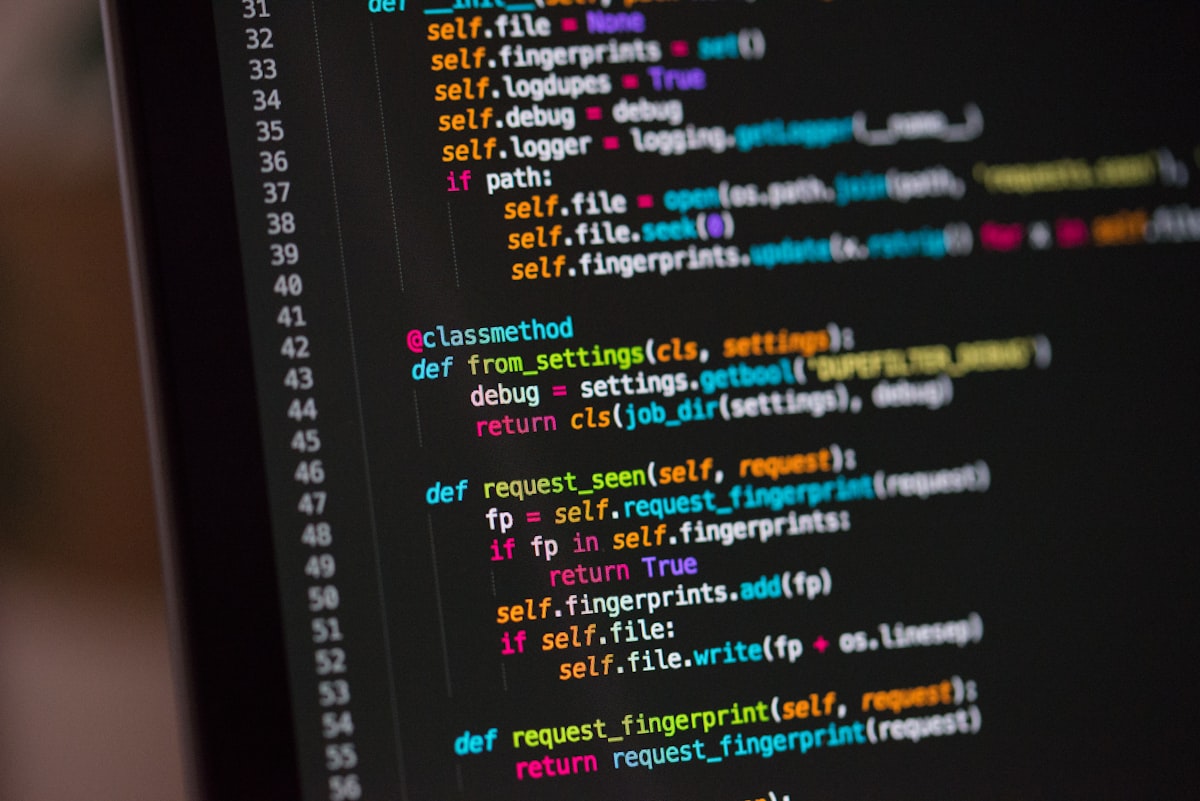
 Here is a structured, step-by-step tutorial designed to give you a foundational understanding of Python.

### Step 1: Why Python?

Python is a high-level, interpreted programming language. It is popular because:

* **Readability:** It looks like English (no semicolons `;` or curly braces `{}` are required to structure code).

* **Indentation-Based:** It uses spacing (indentation) to define blocks of code.

* **Batteries Included:** It comes with a massive standard library for doing everything from web scraping to math.

### Step 2: The Core Building Blocks


#### 2. Basic Arithmetic and Output

You use the `print()` function to display results.


### Step 3: Making Decisions & Looping (Control Flow)


#### 1. Conditional Statements (`if`, `elif`, `else`)

Python uses indentation (4 spaces) to show what code belongs inside the `if` statement.


#### 2. Loops (`for` and `while`)

Loops are used to repeat tasks.


### Step 4: Storing Collections of Data

#### 1. Lists (Ordered, mutable sequences)

### Step 5: Functions (Reusable Code)

### Step 6: Practical Application (File Automation Script)

Let's apply these concepts. Below is a script that automatically reads a list of files in a directory and filters out only the text files.

### Step 7: Next Steps to Practice

1. **Get an IDE:** Download **VS Code** (recommended) or use **Jupyter Notebooks** (via Anaconda).

2. **Interactive Coding:** Try out short exercises on sites like **HackerRank** or **LeetCode** (easy level) to build muscle memory.

3. **Build a Mini-Project:** Build a calculator, a simple password generator, or a script that cleans up your desktop.


Friday, April 3, 2026

CCYI GLOBAL ACADEMY | LEARNING ARENA

CCYI GLOBAL ACADEMY | Course Shop

CCYI GLOBAL ACADEMY

Shop beginner-friendly tech courses, practical training tutorials, data tools, web development content, automation, and digital skills courses from Palace Tech Hub.

🛒 Cart: 0 item(s)
Shop by Category
Microsoft Power Automate Tutorial
CCYI GLOBAL Office Productivity
Microsoft Power Automate Tutorial (Beginner → Practical)
Learn workflow automation, process automation, triggers, and practical Microsoft Power Automate use cases.
₦0,000
Read on Blog
Basic Understanding of Microsoft Excel
CCYI GLOBAL Office Productivity
Basic Understanding of Microsoft Excel (For Beginners)
Start with worksheets, formulas, formatting, sorting, and beginner spreadsheet productivity.
₦0,000
Read on Blog
Excel Tutorial Pivot Tables Macros and VBA
CCYI GLOBAL Office Productivity
Excel Tutorial: Pivot Tables, Macros, and VBA
Advance your Excel skills with automation, reporting, data summaries, and VBA concepts.
₦0,000
Read on Blog
Basic Understanding of Web Development
CCYI GLOBAL ACADEMY Web Development
Basic Understanding of Web Development
A simple introduction to how websites work, frontend/backend concepts, and tools beginners need.
₦0,000
Read on Blog
Basic Understanding of HTML
CCYI GLOBAL ACADEMY Web Development
Basic Understanding of HTML (For Beginners)
Learn the structure of web pages, elements, tags, forms, headings, links, and page layouts.
₦0,000
Read on Blog
Basic Understanding of CSS
CCYI GLOBAL ACADEMY Web Development
Basic Understanding of CSS / CSS INTRODUCTION
Understand styling, colors, spacing, layouts, selectors, and how CSS transforms plain HTML pages.
₦0,000
Read on Blog
Basic Understanding of JavaScript
CCYI GLOBAL ACADEMY Web Development
Basic Understanding of JavaScript (For Beginners)
Learn variables, functions, DOM basics, events, conditions, loops, and website interactivity.
₦0,000
Read on Blog
Basic Understanding of API
CCYI GLOBAL ACADEMY Web Development
Basic Understanding of API (For Beginners)
Understand how applications communicate, exchange data, and connect services through APIs.
₦0,000
Read on Blog
Basic Understanding of Django
CCYI GLOBAL ACADEMY Web Development
Basic Understanding of Django (For Beginners)
A beginner introduction to Python-powered web applications using the Django framework.
₦0,000
Read on Blog
Basic Understanding of Flask
CCYI GLOBAL ACADEMY Web Development
Basic Understanding of Flask (For Beginners)
Discover lightweight Python web development and build simple apps faster with Flask. :contentReference[oaicite:1]{index=1}
₦0,000
Read on Blog
Basic Understanding of Power BI
CCYI GLOBAL ACADEMY Data Analytics
Basic Understanding of Power BI (For Beginners)
Learn dashboard thinking, reports, visuals, data modeling, and beginner business intelligence workflows.
₦0,000
Read on Blog
Basic Understanding of Pandas
CCYI GLOBAL ACADEMY Data Analytics
Basic Understanding of Pandas (For Beginners)
Handle tables, clean data, load files, and perform beginner data analysis with Pandas.
₦0,000
Read on Blog
Basic Understanding of NumPy
CCYI GLOBAL ACADEMYL Data Analytics
Basic Understanding of NumPy (For Beginners)
Understand arrays, numerical computing, and fast calculations for data and scientific work.
₦0,000
Read on Blog
Basic Understanding of Tableau
CCYI GLOBAL ACADEMY Data Analytics
Basic Understanding of Tableau (For Beginners)
Build beginner dashboards and data visualizations using Tableau concepts and workflow basics.
₦0,000
Read on Blog
Basic Understanding of R
CCYI GLOBAL ACADEMY Data Analytics
Basic Understanding of R (For Beginners)
Get started with R programming for statistics, analytics, scripting, and data exploration.
₦0,000
Read on Blog
How To Use Jupyter Notebook For Data Analysis
CCYI GLOBAL ACADEMY Data Analytics
How To Use Jupyter NoteBook For Data Analysis (Beginner Tutorial)
Use notebooks for Python practice, analysis workflows, code execution, and markdown explanations.
₦0,000
Read on Blog
Basic Understanding of Python
CCYI GLOBAL ACADEMY Python & Automation
Basic Understanding of Python (For Beginners)
Learn syntax, variables, functions, logic, loops, and real beginner programming foundations.
₦0,000
Read on Blog
How To Create A Bot
CCYI GLOBAL ACADEMY Python & Automation
HOW TO CREATE A BOT
An introduction to bot concepts, automation logic, and practical beginner bot building ideas.
₦0,000
Read on Blog
3 Python Automation Projects for Beginners
CCYI GLOBAL ACADEMY Python & Automation
3 PYTHON AUTOMATION PROJECTS FOR BEGINNERS
Practice practical automation with beginner-friendly projects that build real confidence.
₦0,000
Read on Blog
Automate with Python Full Course for Beginners
CCYI GLOBAL ACADEMY Python & Automation
Automate with Python – Full Course for Beginners
Discover scripts, repetitive task automation, beginner Python workflows, and useful mini projects.
₦0,000
Read on Blog
Basic Understanding of MySQL
CCYI GLOBAL ACADEMYL Database & SQL
Basic Understanding of MySQL (For Beginners)
Start learning relational databases, tables, records, queries, and database concepts with MySQL.
₦0,000
Read on Blog
Learn SQL Beginner to Advanced in Under 4 Hours
CCYI GLOBAL ACADEMY Database & SQL
Learn SQL Beginner to Advanced in Under 4 Hours
A faster SQL journey covering beginner to more advanced database querying concepts. The blog lists this among older posts. :contentReference[oaicite:2]{index=2}
₦0,000
Read on Blog
Learn 12 Basic SQL Concepts in 15 Minutes
CCYI GLOBAL ACADEMY Database & SQL
Learn 12 Basic SQL Concepts in 15 Minutes
Quickly grasp essential SQL ideas and project-focused beginner query thinking.
₦0,000
Read on Blog
Remote Dictionary Server in-memory data store
CCYI GLOBAL ACADEMY Database & SQL
Remote Dictionary Server in-memory data store
Explore beginner concepts around in-memory data storage and fast-access data systems.
₦0,000
Read on Blog
Master AI Turn Months of Work Into Minutes
CCYI GLOBAL ACADEMY AI & Tech Trends
MASTER AI: TURN MONTHS OF WORK INTO MINUTES
Use AI tools to increase productivity, compress workflows, and speed up content or office tasks.
₦0,000
Read on Blog
Basic Understanding of Internet of Things
CCYI GLOBAL ACADEMY AI & Tech Trends
Basic Understanding of Internet of Things (IoT) – For Beginners
Learn connected devices, sensors, smart systems, and beginner IoT thinking.
₦0,000
Read on Blog
10 Incredible New Technologies That Have Changed The World
CCYI GLOBAL ACADEMY AI & Tech Trends
10 Incredible New Technologies That Have Changed The World
A broader technology awareness course useful for beginners and digital literacy audiences.
₦0,00
Read on Blog
25 technologies that have changed the world
CCYI GLOBAL ACADEMY AI & Tech Trends
25 technologies that have changed the world
Explore foundational technology changes and how innovation shapes society and work.
₦0,000
Read on Blog
The 7 Main Ways Technology Impacts Your Daily Life
CCYI GLOBAL ACADEMY AI & Tech Trends
The 7 Main Ways Technology Impacts Your Daily Life
A practical digital awareness course for students, beginners, and general audiences.
₦0,000
Read on Blog
Technology In Our Life Today And How It Has Changed
CCYI GLOBAL ACADEMY AI & Tech Trends
Technology In Our Life Today And How It Has Changed
A simple tech awareness training focused on modern life, transformation, and relevance.
₦0,000
Read on Blog
Data Is The New Oil
CCYI GLOBAL ACADEMY AI & Tech Trends
Data Is The New Oil -- And That's A Good Thing
Understand the value of data, analytics culture, and why data matters in modern work.
₦0,000
Read on Blog
Data was, Analytics is, the New Oil
CCYI GLOBAL ACADEMY Data Analytics
Data was, Analytics is, the New Oil
A practical thought-leadership training around analytics relevance and insight-driven work.
₦0,000
Read on Blog
Technology Is The New Oil
CCYI GLOBAL ACADEMY AI & Tech Trends
TECHNOLOGY IS THE NEW OIL
A broad technology awareness teaching centered on digital opportunity and modern relevance.
₦0,000
Read on Blog
No courses found in this category.

Course Cart

    Total: ₦0

    Tuesday, March 31, 2026

    Basic Understanding of Internet of Things (IoT) – For Beginners


    1. What is Internet of Things (IoT)?

    The Internet of Things (IoT) refers to physical devices connected to the internet that can collect, send, and receive data.

    👉 In simple terms:
    IoT = everyday objects + internet + data

    2. Simple Explanation

    👉 IoT allows devices to:

    • Sense what is happening
    • Communicate with other devices
    • Make decisions or automate actions

    3. How IoT Works


    Basic flow:

    1. Device/Sensor collects data
    2. Data is sent via the internet
    3. Stored/processed in the cloud/server
    4. User views or controls via app or dashboard

    4. Components of IoT

    a. Devices (Things)

    Physical objects like:

    • Smart bulbs
    • Smart watches
    • Temperature sensors
    • Cameras

    b. Sensors

    Sensors collect data like:

    • Temperature
    • Motion
    • Light
    • Humidity

    c. Connectivity

    Devices connect using:

    • Wi-Fi
    • Bluetooth
    • Mobile networks

    d. Cloud/Server

    Stores and processes data.

    e. User Interface

    Apps or dashboards where users interact with devices.

    5. Examples of IoT in Real Life

    4
    • Smart homes (lights, fans, security systems)
    • Smart watches (health tracking)
    • Smart agriculture (automated irrigation)
    • Smart cities (traffic control)
    • Smart cars

    6. Simple IoT Example

    👉 Smart light system:

    • You use your phone
    • Send signal via internet
    • Light turns ON/OFF automatically

    7. Technologies Behind IoT

    • Sensors
    • Microcontrollers (e.g., Arduino, ESP32)
    • Internet protocols
    • Cloud platforms
    • Programming (Python, C, JavaScript)

    8. Advantages of IoT

    • Automation (less manual work)
    • Efficiency (save time and energy)
    • Remote control (control devices anywhere)
    • Data collection and analysis

    9. Challenges of IoT

    • Security risks
    • Privacy concerns
    • Internet dependency
    • Cost of setup

    10. IoT for Students (Opportunities)

    Students can:

    • Build smart home projects
    • Create automation systems
    • Develop IoT-based startups
    • Work in tech industries
    • Combine IoT with web development

    11. Simple Beginner Project Ideas

    • Smart light using phone
    • Temperature monitoring system
    • Automatic fan control
    • Smart door alert system

    12. Tools for Beginners

    • Arduino IDE
    • ESP32 / Arduino board
    • Sensors (temperature, motion)
    • Mobile apps (Blynk, IoT dashboards)

    13. Simple Summary

    👉 IoT is about:

    • Connecting devices to the internet
    • Collecting data
    • Automating actions
    • Making life smarter and easier

    Power Teaching Line (for your class)

    👉 “IoT is not just about smart devices—it is about creating smart solutions for real-world problems.”

    Saturday, March 28, 2026

    Basic Understanding of Pandas (For Beginners)

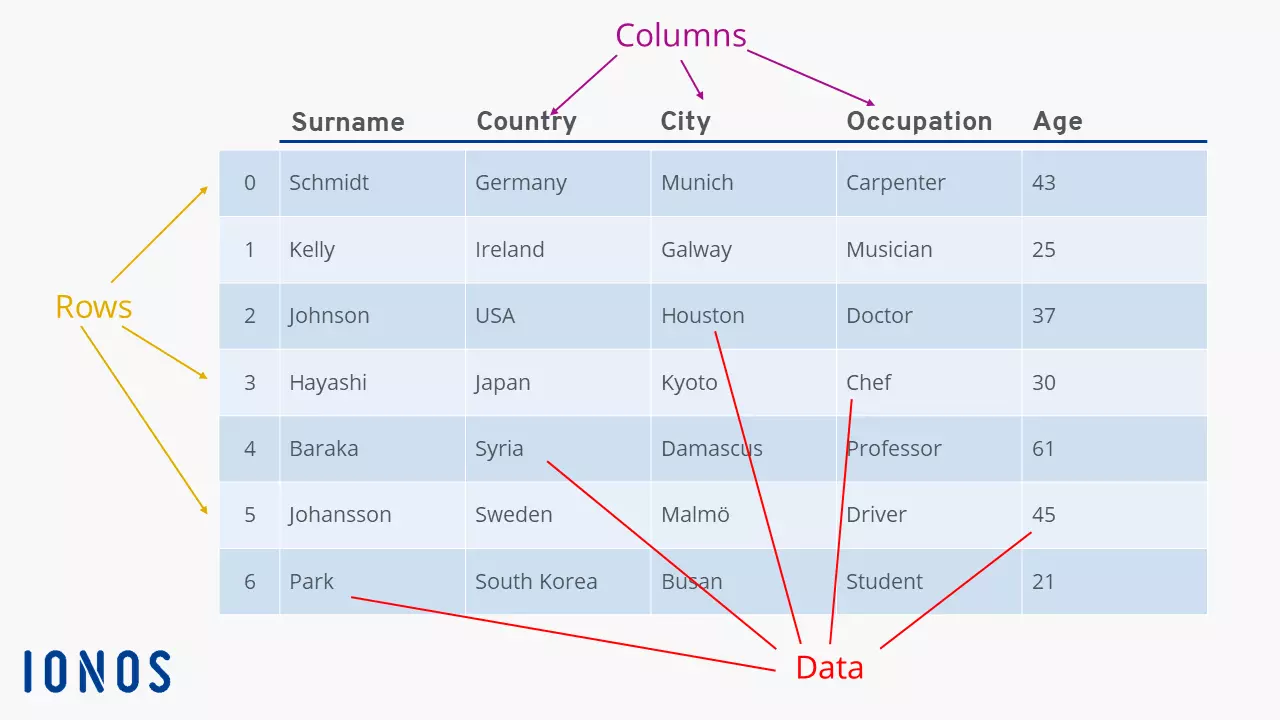
     https://www.ionos.com/digitalguide/fileadmin/_processed_/e/9/csm_pandas-dataframe-structure_0ab3bff2f5.webp

    1. What is Pandas?

    Pandas is a Python library used for data analysis and manipulation.

    👉 In simple terms:
    Pandas = Excel inside Python (but more powerful)

    2. Why Learn Pandas?

    Pandas helps you:

    • Work with large datasets
    • Clean messy data
    • Analyze information quickly
    • Perform calculations easily
    • Prepare data for reports or visualization

    3. Installing Pandas

    First install Pandas:

    pip install pandas

    Then import it:

    import pandas as pd

    👉 pd is just a shortcut name.

    4. Key Data Structures in Pandas

    a. Series (1D Data)

    import pandas as pd

    data = pd.Series([10, 20, 30])
    print(data)

    👉 Like a single column in Excel.

    b. DataFrame (2D Data)

    data = {
    "Name": ["John", "Mary"],
    "Age": [25, 30]
    }

    df = pd.DataFrame(data)
    print(df)

    👉 Like a table (rows and columns).

    5. What a DataFrame Looks Like


    6. Reading Data (CSV File)

    df = pd.read_csv("data.csv")
    print(df)

    👉 Loads data from a file (like Excel).

    7. Viewing Data

    df.head() # First 5 rows
    df.tail() # Last 5 rows
    df.info() # Structure of data
    df.describe() # Statistics

    8. Selecting Data

    Select a Column

    df["Name"]

    Select Multiple Columns

    df[["Name", "Age"]]

    9. Filtering Data

    df[df["Age"] > 25]

    👉 Shows only rows where age is greater than 25.

    10. Adding a New Column

    df["Salary"] = [50000, 60000]

    11. Basic Operations

    df["Age"].mean() # Average
    df["Age"].max() # Maximum
    df["Age"].min() # Minimum

    12. Handling Missing Data

    df.isnull() # Check missing values
    df.dropna() # Remove missing values
    df.fillna(0) # Replace missing values

    13. Sorting Data

    df.sort_values("Age")

    14. Real-Life Uses of Pandas


    Students can use Pandas for:

    • Analyzing Excel data
    • Business reports
    • Financial tracking
    • Student result analysis
    • Research and projects

    15. Simple Practical Example

    import pandas as pd

    data = {
    "Name": ["Alice", "Bob", "Charlie"],
    "Score": [80, 90, 75]
    }

    df = pd.DataFrame(data)

    # Show students who scored above 80
    result = df[df["Score"] > 80]

    print(result)

    16. Pandas vs Excel

    FeatureExcelPandas
    Ease of useEasyRequires coding
    Large dataLimitedHandles large data
    AutomationLimitedVery powerful
    SpeedModerateFast

    17. Simple Summary

    👉 Pandas is:

    • A tool for working with data
    • Like Excel but more powerful
    • Essential for data analysis

    Power Teaching Line (for your class)

    👉 “If Excel helps you see data, Pandas helps you understand and control it at scale.”

    VERCEL DEPLOYMENT

      Hobby (Free) Plan You can have up to 200 projects (websites/apps) under one account. Each project can have its own: Production deploy...